Let the workout session commence...
2013-01-30
Inspirational body weight exercices
Hmmm, note to self, if I ever find myself thinking that you can't workout at home, check out this video
Let the workout session commence...
Let the workout session commence...

2013-01-03
OpenOffice alternate background color on rows
Thought I'd write down a short post on how to do this thing, I've been wondering for a long time and finally took the time to figure out how to actually do it.
The easiest way I found was to goto Format/Conditional Formatting change to "Formula is" and then write ISEVEN(ROW()) and then change the style to something interesting.
The end result? I made it so each even row got a light cyan blue, and the spread sheet was waaaaaay easier to read :)
The easiest way I found was to goto Format/Conditional Formatting change to "Formula is" and then write ISEVEN(ROW()) and then change the style to something interesting.
The end result? I made it so each even row got a light cyan blue, and the spread sheet was waaaaaay easier to read :)
2012-12-10
Caching loaded images in AS3
Link to example project
Link to stack overflow
So, I read this question on StackOverflow about a guy who wanted to load images several times but didn't want to have them placed inside a swf-file or a swc-file (or rather wanted to have the swc created at runtime).
Storing images inside a cache in that way isn't super easy so I thought I would give it a try and see how a solution to that would work. I started out with a simple Static ImageManager but shortly found that it wasn't nearly as easy as I first thought it would be due to race conditions and as3 being rather limited to how you can work with loaded content, queuing loads etc.
I ended up creating two classes and an extra Main-class to provide as an example:
ImageManager (static class, keeps url as id for the image sand stores loaded images bitmapdata)
FileLoader (dynamic instances, does the actual load of objects and then notifies when it is done)
Since there is no easy way of storing files on this blog, I had to create some online storage service [chose Skybox today].
Anyways, here is the link to my example project, source code is "pasted" below for "completeness" if you just wanna see the files and don't wanna download the entire project.
Main.as - link to pastie
ImageManager.as - link to pastie
FileLoader.as - link to pastie
Link to stack overflow
So, I read this question on StackOverflow about a guy who wanted to load images several times but didn't want to have them placed inside a swf-file or a swc-file (or rather wanted to have the swc created at runtime).
Storing images inside a cache in that way isn't super easy so I thought I would give it a try and see how a solution to that would work. I started out with a simple Static ImageManager but shortly found that it wasn't nearly as easy as I first thought it would be due to race conditions and as3 being rather limited to how you can work with loaded content, queuing loads etc.
I ended up creating two classes and an extra Main-class to provide as an example:
ImageManager (static class, keeps url as id for the image sand stores loaded images bitmapdata)
FileLoader (dynamic instances, does the actual load of objects and then notifies when it is done)
Since there is no easy way of storing files on this blog, I had to create some online storage service [chose Skybox today].
Anyways, here is the link to my example project, source code is "pasted" below for "completeness" if you just wanna see the files and don't wanna download the entire project.
Main.as - link to pastie
ImageManager.as - link to pastie
FileLoader.as - link to pastie
2012-12-06
Online code editor
So, today I was trying to figure out what type of resolutions that were used on android devices. And I ran into the following list:
1   2560*1600
2   1366*768
3   1280*800
4   1280*768
5   1024*768
6   1024*600
7   960*640
8   960*540
9   854*480
10  800*600
11  800*480
12  800*400
13  640*360
14  640*240
15  480*320
16  400*240
17  320*240
The end result was a webpage called JSBin, where it is possible to just mash down some js-script and then run it automatically.
No code hinting (unfortunately) but it gets the job down and, the end result was this super nice and clean code:
var input = ["1 2560*1600","2 1366*768","3 1280*800","4 1280*768","5 1024*768",
"6 1024*600","7 960*640","8 960*540","9 854*480","10 800*600","11 800*480",
"12 800*400","13 640*360","14 640*240","15 480*320","16 400*240","17 320*240"]
for(var i=0; i < input.length; ++i) {
var s = input[i].split(" ");
for(var j=0; j < s.length; ++j) {
if(j > 0 && s[j]) {
console.log("resolution=" + s[j] + " - Ratio: " + s[j].split("*")[0] / s[j].split("*")[1]);
}
}
}
You can find the editor on jsbin.com and my super nice code should be available at http://jsbin.com/omiyik/22/edit. Now, assuming no one breaks it it should give you this output:
- "resolution=2560*1600 - Ratio: 1.6"
- "resolution=1366*768 - Ratio: 1.7786458333333333"
- "resolution=1280*800 - Ratio: 1.6"
- "resolution=1280*768 - Ratio: 1.6666666666666667"
- "resolution=1024*768 - Ratio: 1.3333333333333333"
- "resolution=1024*600 - Ratio: 1.7066666666666668"
- "resolution=960*640 - Ratio: 1.5"
- "resolution=960*540 - Ratio: 1.7777777777777777"
- "resolution=854*480 - Ratio: 1.7791666666666666"
- "resolution=800*600 - Ratio: 1.3333333333333333"
- "resolution=800*480 - Ratio: 1.6666666666666667"
- "resolution=800*400 - Ratio: 2"
- "resolution=640*360 - Ratio: 1.7777777777777777"
- "resolution=640*240 - Ratio: 2.6666666666666665"
- "resolution=480*320 - Ratio: 1.5"
- "resolution=400*240 - Ratio: 1.6666666666666667"
- "resolution=320*240 - Ratio: 1.3333333333333333"
2012-11-23
The most amazing file finder ever
So, starting a new job is always interesting. The last couple of months I've been doing nothing except trying to get up to speed on how things are done here at EA DICE. There's a plethora of tools and special solutions for everything. It kind of feels like "whatever you have learned in the past, unlearn it and do it our way". Everything is special made and there are many, many abstraction levels on top of everything. And it is totally awesome! :D
Especially the fact that you are surrounded by so many talented people that knows exactly what they are talking about. I haven't found anything this far that someone in the studio doesn't know how to solve, and that is pretty damn cool.
Anyways, time to write about stuff actually related to the topic...
I happened to watch one of our tech engineers browsing for files on his hard drives and saw him finding the correct files in just a couple of milliseconds. No matter if the file was on his c/d/e/f drive I found myself staring in disbelief when he just wrote a couple of characters in a search field and the program presented him with the possible files in REALTIME. Once I finally got my jaw to start working again I was smart enough to ask about what kind of godly program he was using.
The program that he used is developed by "voidtools" and is called "everything". It works by indexing your harddrives and then presents all these files/folders inside some kind of "ugly window" with a search bar. It's not visually pretty but on the other hand it is pretty darn awesome. Best of all, it is SUPER RESPONSIVE.
I have about 4TB of data and well above 5M files spread over 3 disks and even with that much data I never even notice that it actually has to think, ever, whenever I start typing anything. Instant feedback with the filenames matching your search criteria.
The tool can be found from voidtools download page. It's probably one of the best tools I have ever found.
On a sidenote, if you are actually looking for some specific text string inside files instead of the actual file name, there is a program called Agent Ransack that let's you search for a text string inside all files matching for example *.cpp and presents these in a well thought out way.
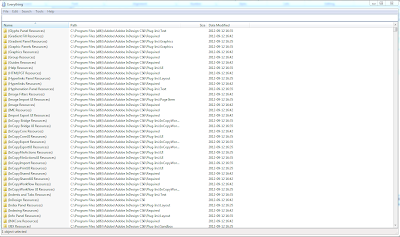
Awesome file/folder finder: everything
Awesome text finder inside files: Agent Ransack
Especially the fact that you are surrounded by so many talented people that knows exactly what they are talking about. I haven't found anything this far that someone in the studio doesn't know how to solve, and that is pretty damn cool.
Anyways, time to write about stuff actually related to the topic...
I happened to watch one of our tech engineers browsing for files on his hard drives and saw him finding the correct files in just a couple of milliseconds. No matter if the file was on his c/d/e/f drive I found myself staring in disbelief when he just wrote a couple of characters in a search field and the program presented him with the possible files in REALTIME. Once I finally got my jaw to start working again I was smart enough to ask about what kind of godly program he was using.
The program that he used is developed by "voidtools" and is called "everything". It works by indexing your harddrives and then presents all these files/folders inside some kind of "ugly window" with a search bar. It's not visually pretty but on the other hand it is pretty darn awesome. Best of all, it is SUPER RESPONSIVE.
I have about 4TB of data and well above 5M files spread over 3 disks and even with that much data I never even notice that it actually has to think, ever, whenever I start typing anything. Instant feedback with the filenames matching your search criteria.
The tool can be found from voidtools download page. It's probably one of the best tools I have ever found.
On a sidenote, if you are actually looking for some specific text string inside files instead of the actual file name, there is a program called Agent Ransack that let's you search for a text string inside all files matching for example *.cpp and presents these in a well thought out way.
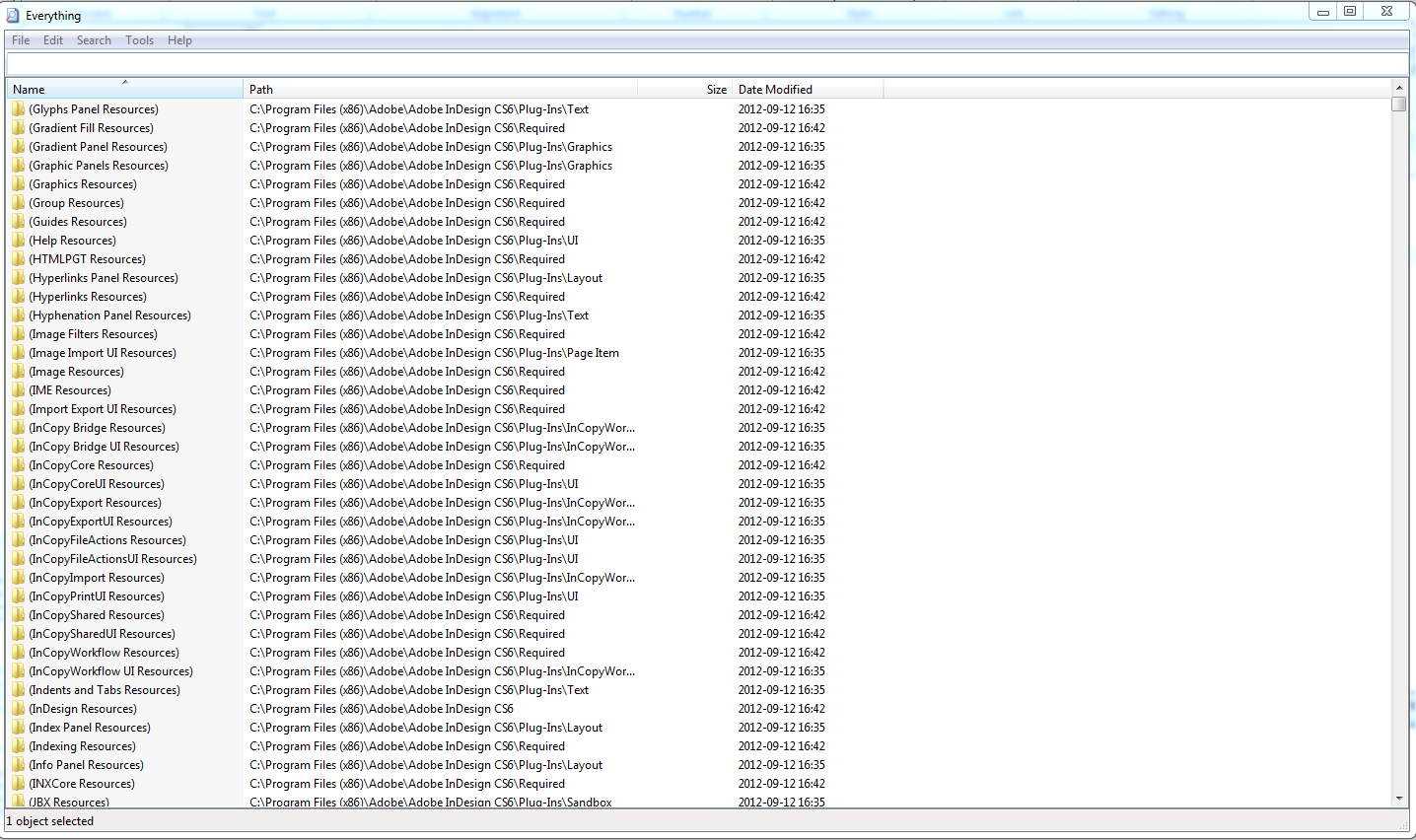
Awesome file/folder finder: everything
Awesome text finder inside files: Agent Ransack
2012-09-21
JSFL and Flash
Just a short post so I'll be able to find this in the future. I just decided to start look into JSFL, the reason is that I found a lot of FLA-files in the past where there are a lot of items that are "exported/imported" that I need to access. And they are found in deep hierarchies and kind of hard to grasp. So I'm about to start organizing these and place them in seperate folders.
Found this great page where you can start using something called "organizeLibrary". I will probably expand on this in the future.
http://code.google.com/p/guttershark/source/browse/branches/development/lib/jsfl/?r=405
Found this great page where you can start using something called "organizeLibrary". I will probably expand on this in the future.
http://code.google.com/p/guttershark/source/browse/branches/development/lib/jsfl/?r=405
2012-09-05
Windows7 Firewall turn off doesn't mean turn off
So, two days ago I installed Guild Wars 2 and intended to play. I had some issues with accessing internet so I did some regular port forwarding in router (80, 443, 6112, 6600) and turned off windows firewall.
After a couple of hours of trying to figure out what's wrong it turns out that by deactivating windows firewall, NO new applications can access internet. So when you turn off windows firewall, the only that thing that REALLY happens is that you turn off queries for allowing applications to access internet that previously hasn't been marked as safe. That's a new functionality of "turn off" that I previously wasn't aware of.
Oh Microsoft, why, why, why?
After a couple of hours of trying to figure out what's wrong it turns out that by deactivating windows firewall, NO new applications can access internet. So when you turn off windows firewall, the only that thing that REALLY happens is that you turn off queries for allowing applications to access internet that previously hasn't been marked as safe. That's a new functionality of "turn off" that I previously wasn't aware of.
Oh Microsoft, why, why, why?
Prenumerera på:
Inlägg (Atom)